OBDMobileCEL
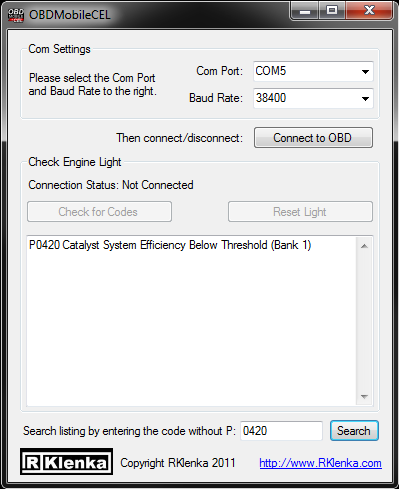
Details
OBDMobileCEL is a application to read your vehicle's Check Engine Light (CEL).
For a full On Board Diagnostic System we recommend:

OBDMobile
Instructions
OBDMobileCEL is a lot simpler than its complicated name.
- First you MUST HAVE A OBD CONNECTOR
Which you can buy at our store or just about anywhere online
- Connect your obd connector to your vehicle and know what Com Port it is connected to.
- Start OBDMobileCEL and tell it your COM port and Baud Rate(38400)
- Then press "Connect to OBD" this might take a few seconds.
- Once connected you can "Check for Codes" and or "Reset Light".
- If you know your code number already you can search using the box at the bottom.
Just enter the code without the P (EX: P0130 just enter 0130)
For all this and much more including:
- Over 15+ Live Vehicle Data!
- Est. MPG/KML
- MPH/KMH
- Data logging!
- GPS Routing/Mapping!
NOTE: Though you can still email me with questions, this project is not currently being worked on.
Check out:
OBDMobile
Downloads

Comments
blog comments powered by